

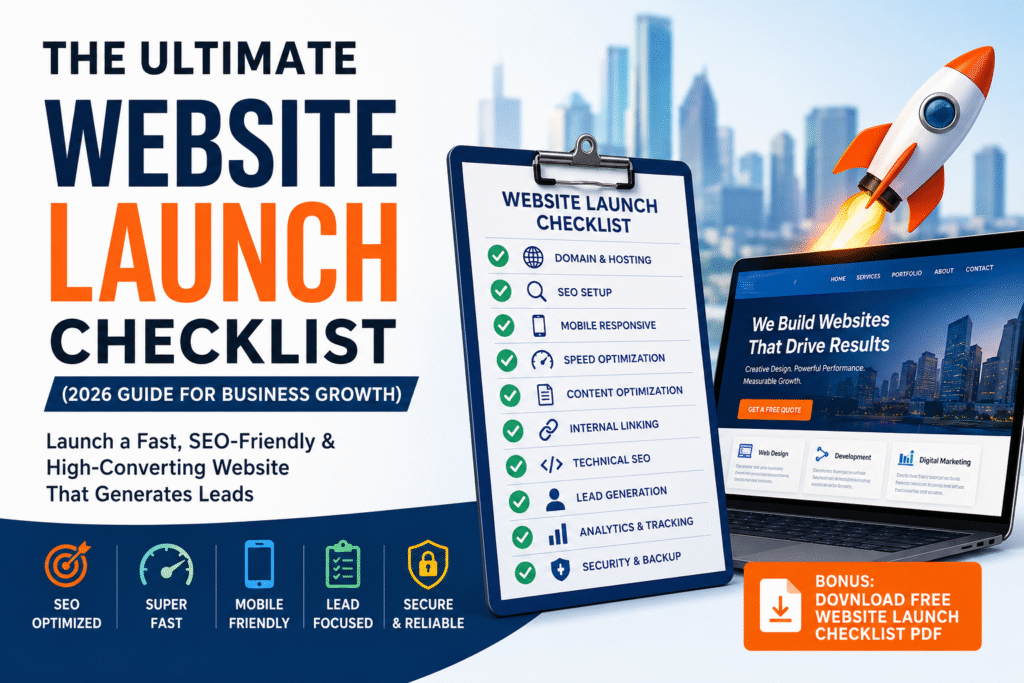
The Ultimate Website Launch Checklist (2026 Guide for Business Growth)
Launching a website is exciting — but also risky. Many businesses invest thousands of dollars into a new website, only to realize later that it: Doesn’t rank on Google Loads slowly Doesn’t generate leads Has technical errors If you’re targeting competitive markets like web design Houston, digital marketing Houston TX, or web development Sugar Land, launching your website correctly is critical. This complete website launch checklist will ensure your website is fully optimized for: ✔ SEO✔ Speed✔ User experience✔ Lead generation Why a Website Launch Checklist is Important Without a checklist, you risk: Losing SEO rankings Poor user experience Low conversion rates Technical issues According to official guidelines by Google: Websites must be optimized for performance, usability, and content quality. Domain & Hosting Setup Before launching, ensure: ✔ Domain is properly connected✔ SSL certificate installed (HTTPS)✔ Fast hosting provider Slow hosting affects both SEO and conversions. 👉 Need help setting up a fast website?Web Development Services: SEO Basics Setup Must-have SEO elements: ✔ Meta titles & descriptions✔ Proper H1, H2 structure✔ Keyword optimization✔ SEO-friendly URLs Example: ❌ yourwebsite.com/page1✔ yourwebsite.com/web-design-houston Use tools like:https://ads.google.com/home/tools/keyword-planner/ Mobile Responsiveness Check More than 70% of users are on mobile. Ensure: ✔ Responsive design✔ Clickable buttons✔ Fast mobile loading Test using:https://search.google.com/test/mobile-friendly Website Speed Optimization Speed is critical. According to Google Core Web Vitals:Ensure: ✔ Page loads under 3 seconds✔ Images are compressed✔ Caching enabled Content Optimization Your content should include: ✔ Target keywords✔ Clear headings✔ Engaging copy✔ Value-driven information According to HubSpot: Businesses with optimized content generate more leads. Internal Linking Setup Internal links improve SEO and user navigation. Add links to: 👉 Web Design Services 👉 Digital Marketing Services 👉 Portfolio 👉 Contact Page Technical SEO Checklist ✔ XML sitemap✔ Robots.txt file✔ No broken links✔ HTTPS enabled✔ Schema markup Follow standards from:https://www.w3.org/WAI/standards-guidelines/ Lead Generation Setup Your website must convert visitors. Add: ✔ Contact forms✔ CTA buttons✔ Live chat (optional)✔ Clear phone/email CTA examples: Get a Free Quote Book a Consultation Contact Us Today 👉 Start generating leads now:https://amaztechnology.com/contact/ Analytics & Tracking Setup Before launch, install: ✔ Google Analytics✔ Google Search Console✔ Conversion tracking This helps monitor: Traffic Leads User behavior Security & Backup Protect your website with: ✔ SSL certificate✔ Regular backups✔ Security plugins Security builds trust and protects your data. How This Checklist Helps Houston Businesses For businesses targeting: Web design Houston Digital marketing Houston TX Web development Sugar Land This checklist ensures: ✔ Better Google rankings✔ Faster website✔ Higher conversions✔ More leads Final Thoughts Launching a website without a checklist is risky. But with proper planning, you can: ✔ Avoid costly mistakes✔ Improve SEO rankings✔ Increase traffic✔ Generate consistent leads Ready to Launch Your Website? If you want a fully optimized, high-converting website— 👉 Get a Free Consultation Today:https://amaztechnology.com/contact/

Custom Software vs Off‑the‑Shelf: What’s Best for Your Business?
In today’s competitive digital landscape, choosing the right software can significantly impact your business’s growth, efficiency, and bottom line. Most companies eventually face a common question: custom vs off-the-shelf software—which is the right choice? To help you decide, let’s explore what each option means, their pros and cons, and how to determine the best fit for your business needs. 🔍 What Is Custom Software? Custom software is a solution specifically designed and developed to meet your business’s unique requirements. Instead of relying on a one-size-fits-all approach, it allows you to build software from scratch that aligns with your processes, goals, and industry standards. ✅ Benefits of Custom Software Tailored Fit: It adapts precisely to your workflows and business logic. Scalable: Easily evolves with your growing business. Competitive Advantage: Offers features your competitors may not have. Enhanced Security: Built with your specific compliance and data protection needs in mind. Seamless Integration: Connects smoothly with your existing tools and platforms. Although custom software requires a higher upfront investment, the long-term benefits often outweigh the initial costs. 🔍 What Is Off-the-Shelf Software? Off-the-shelf software is pre-built, ready-to-use software available to a broad audience. Think of tools like Microsoft Office, Shopify, or QuickBooks. These are designed to meet common business needs and come with standard features. ✅ Benefits of Off-the-Shelf Software Cost-Effective: Lower initial cost compared to custom development. Quick Setup: Can be installed and used almost immediately. Proven Reliability: Widely used and tested across industries. Regular Updates: Comes with vendor-provided updates and support. User-Friendly: Usually includes documentation and customer support. However, its standard features might not always match your business’s specific needs. 📊 Custom vs Off-the-Shelf Software: Key Factors to Consider When evaluating custom vs off-the-shelf software, consider the following: 1. Your Business Complexity If your business involves unique processes or operates in a niche industry, custom software is more likely to deliver value. 2. Time and Budget Off-the-shelf tools are budget-friendly and faster to implement. In contrast, custom solutions take time and investment but are better suited for long-term needs. 3. Scalability If you expect rapid growth or shifting needs, custom software offers the flexibility to scale without limitations. 4. Security & Compliance Industries like healthcare, finance, or legal often require strict data controls. Custom solutions can be built with these regulations in mind. 🧠 When to Choose Custom Software Go for custom software when: Off-the-shelf tools can’t meet your specific needs. You want to build long-term digital assets. You need full control over features and updates. Your operations demand tight security or regulatory compliance. 🧠 When to Choose Off-the-Shelf Software Choose off-the-shelf software when: You’re a startup or small business with limited time and budget. Your processes align with standard solutions. You need a quick solution for common tasks like invoicing, payroll, or scheduling. 💡 Final Thoughts on Custom vs Off-the-Shelf Software Ultimately, the decision between custom vs off-the-shelf software depends on your goals, timeline, and business complexity. While off-the-shelf tools offer speed and affordability, custom solutions provide flexibility, competitive advantage, and scalability. Some businesses start with off-the-shelf options and later upgrade to custom software as their needs evolve. Regardless of where you are in your journey, making the right software choice today can shape your success tomorrow. 🚀 Need Help Deciding? At Amaz Technology, we help businesses find and implement the best software strategies—whether it’s customizing your own system or selecting the right off-the-shelf tools. 👉 Contact us now for a free consultation and build smarter, faster, and more efficient with the right solution.